If you’re visiting Korea in 2026, you might quickly realize something frustrating:
Google Maps does not always provide accurate public transportation routes in Korea.
It works for walking.
However, car routes, subway transfers, and bus schedules can sometimes be inaccurate.
That’s why locals use
Kakao’s navigation app,
KakaoMap.
In this guide, I’ll show you exactly how to use kakaomap in english using a real scenario:
👉 From Seoul Station
👉 To Daiso Myeongdong Station Branch
Daiso Myeongdong is a popular destination for many travelers in Myeongdong.
Step 1: Change KakaoMap to English
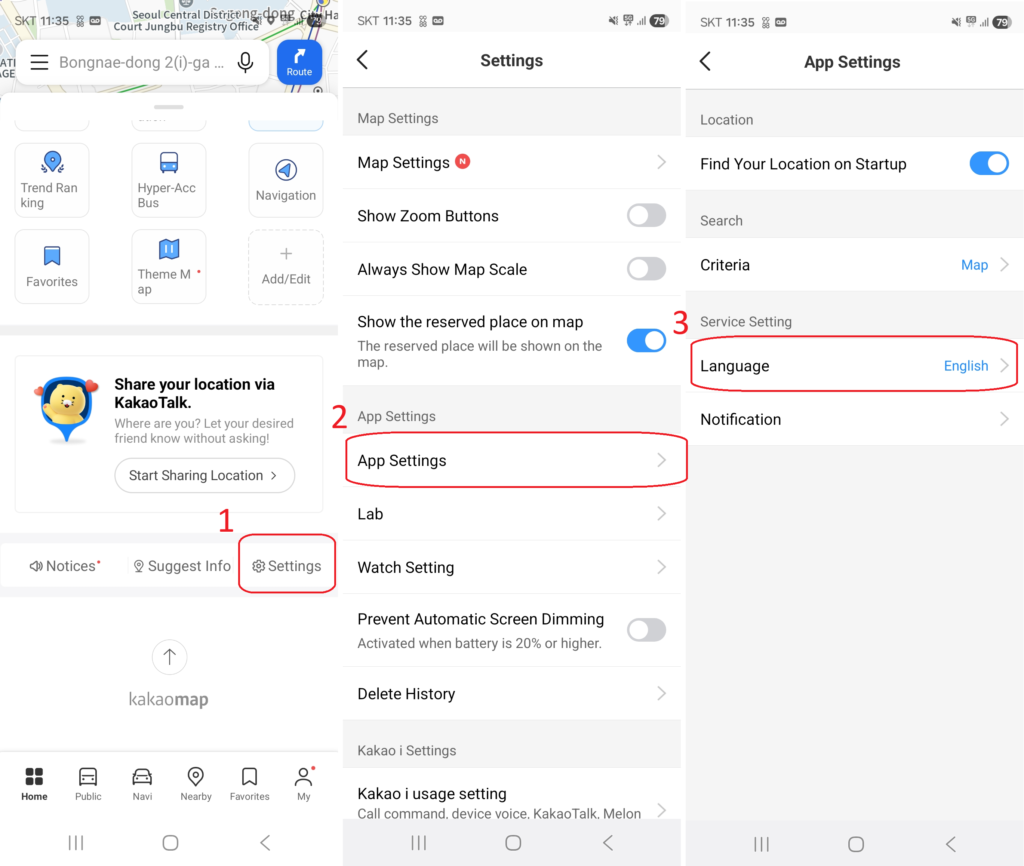
- Open KakaoMap
- Go to Settings
- Change Language to English
Important:
Some place names will still appear in Korean. That’s normal.
Korean map data prioritizes local naming conventions.
If you’re still deciding between apps, read
Google Maps vs Naver Map vs Kakao Map in Korea (2026 Complete Tourist Guide)
for a full comparison.
Step 2: Search Your Destination
Search:
“Seoul Station”
“Daiso Myeongdong”
If English search fails, copy and paste this:
다이소 명동역점
This trick solves most search problems.
(If the English name of the area doesn’t appear, you may need to copy the Korean name.)
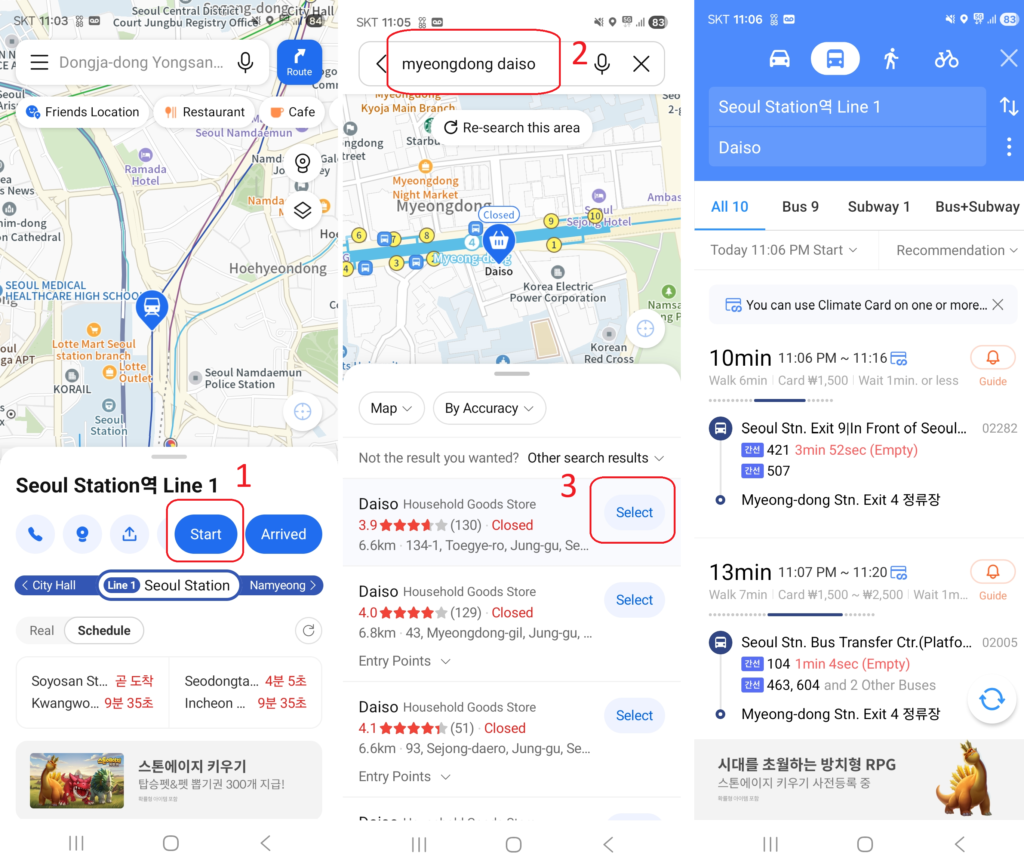
Enter your departure and destination points and it will automatically provide you with various recommended routes.
Walking, recommended routes, subway routes, bus routes, and direct car routes.
Select your preferred route and you’ll receive detailed information, including total travel time, route, bus or subway stops, number of stops, and total walking time.
You can also press the GPS button to compare your current location with your destination, helping you decide when to get off the bus or subway.
Enter your departure and destination points and it will automatically provide you with various recommended routes.
Walking, recommended routes, subway, bus, and direct car travel options.
Select your preferred route and you’ll receive detailed information, including total travel time, route, bus or subway stop location, number of stops, and total walking time.
You can also press the GPS button to compare your current location with your destination, helping you decide when to get off the bus or subway.
You can easily find information like how to find a bus stop, when the bus will arrive, and whether the bus is crowded or free.
(Many Koreans speak basic English and are always ready to help travelers, so feel free to ask for help.)
Step 3: Compare Walking vs bus
From Seoul Station to Myeongdong:
🚶 Walking
30–40 minutes
Not ideal with luggage
🚇 Bus or Subway (Recommended)
15–20 minutes
Usually via Line 4 (subway)
Cheap and efficient
If you’re new to Korean transit cards, read
How to Use T-money Card in Korea for Tourists (2026)
before riding.
How to Read the Subway Route Screen
This is where many first-time visitors panic.
Here’s what matters:
- Colored lines = subway lines
- Transfer numbers = station changes
- Total time includes walking inside stations
If you see Line 4 (light blue), follow the light blue signs in the station.
Don’t overthink it.
We’ll be adding a subway-focused guide soon.
Exit Strategy (This Matters More Than You Think)
When you arrive at Myeongdong Station:
To reach Daiso Myeongdong, take Exit 1 or Exit 2.
(Your destination is between Exits 1 and 2.)
Use Exit 6 for the main shopping street.
Choosing the wrong exit can add 5–10 extra minutes of walking — especially confusing with luggage.
This is something Google Maps often doesn’t emphasize clearly in Korea.
Why KakaoMap Works Better Than Google Maps in Korea
Unlike Google Maps:
- Real-time bus arrival data is accurate
- Subway transfers are reliable
- Local businesses are better indexed
- Exit numbers are clearer
In Korea, KakaoMap isn’t optional — it’s essential.
If you’re landing at the airport and navigating immediately, see
How to Get from Incheon Airport to Hongdae (2026 Complete Local Guide)
for another real transit example.
Pro Tips for 2026 Travelers
✔ Screenshot your route in case of weak signal
✔ Double-check last train times at night
✔ Copy-paste Korean names when searching
✔ Zoom in to check exit numbers before arrival
If you’re still unsure about connectivity, read
Do You Need a SIM Card in Korea? SIM vs eSIM vs Pocket WiFi (2026 Guide)
before your trip.
Final Thoughts
Using KakaoMap in English is not complicated.
But it is different from what most international travelers expect.
Once you understand:
- How search behaves
- How subway lines are displayed
- How exits are labeled
Navigation in Seoul becomes simple.
The key is using the right tool.
And in 2026 Korea, that tool is KakaoMap.
For more official travel information, visit the Korea Tourism Organization website.